
Use SMS Group Management to set up and manage groups of iSAMS users with security privileges and apply a sender identity. This gives more control over the use of SMS messages sent from iSAMS.
A 'Default Security Group' is created by iSAMS Support which includes all users. Any new groups you create work in a top down method, filtering through the groups listed in SMS Group Management.
For example, if you create a security group for 'Training' staff any privileges set for the group override the privileges held for users in this group in the 'Default Security Group'. You could configure the 'Default Security Group' so that all messages require authorisation and configure the 'Training' group so that messages sent by anyone from this group do not require authorisation.
You may prefer to make the Default Security Group inactive.
To open the SMS Group Management:
- Select the iSAMS Control Panel from the left hand menu.
- Select the SMS Gateway listed within the applets available.
Select SMS Group Management from the right hand menu to display this screen:
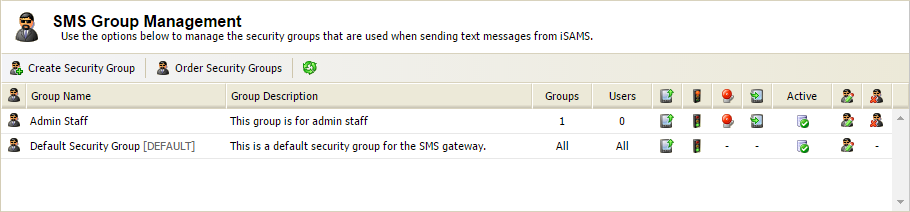
All groups are listed here with the number of user groups and individual users listed in each security group. Icons indicate each security group's properties:Icon Explanation 
Outbound. If this icon is displayed the group is authorised to compile outbound SMS messages. 
Indicates that messages sent by the group do not require authorisation. 
Indicates that messages sent by the group require authorisation. 
Emergency broadcasts can be sent by this group. 
Inbound. If this icon is displayed the group is authorised to receive inbound SMS messages. 
Active. If this icon is displayed, this group is active and users linked to this group can use the SMS function in iSAMS. Choose to:
- Create a security group.
- Change the order of security groups. This can have an effect on users who are linked to more than one group.
- Edit a security group. Update details of an existing group.
- Delete a security group.