
Use the Configuration tab in the Registration module to override automatic updates to the Registration module.
Be aware that updating data in this way is irreversible.
An update on procedures and data used in the module is automatically run overnight. This form is useful if you need to update the module immediately when changes have been made. Use the functions available if a task does not run as expected in the module.
To override automatic update, follow the steps below:
- Open the Registration module and select the Configuration tab.
- Select Registration Data Procedures from the right hand menu to display this screen:
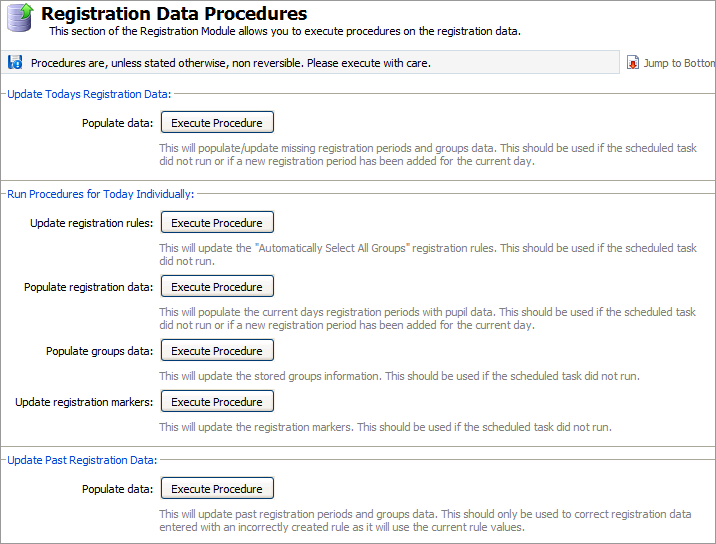
Use the functions available as required:
Section
Function
Use the Execute Procedure button to update...
Update Todays Registration Data
Populate data
All the procedures and data within the module that have been added today. For example, use this button if a task does not run when:
Run Procedures for Today Individually
Update registration rules
Registration rules which have been added today. This will only update registration rules which have been set up to include all selections from the group list.
Populate registration data
Amendments to student data in registration periods. Use this, for example, when a student has moved to a new tutor group.
Populate groups data
Amendments to the groups selected for a registration rule . Use this when selections have been added manually from groups when adding or editing a registration rule. Once the student data held within the group has been updated, using this function, the registration rule will operate as expected.
Update previous markers
Amendments to the colour or code used to indicate attendance status in the school register.
Update Past Registration Data
Populate data
Past registration periods and groups used in registration rules. Only use this when a registration rule has been used incorrectly and the data held within it needs to be amended. Edit the registration rule in the School Registration Rules screen and then use this button.