
Use the Group View tab in your selected child activity module to add multiple pupils to an activity group.
All pupils who are to take part in your selected activity must be linked to an activity group.
Be aware that the Activities Manager module is very date driven. You must ensure that event dates, group dates and pupil participation dates line up to ensure that features are displayed as expected.
To add pupils to a group:
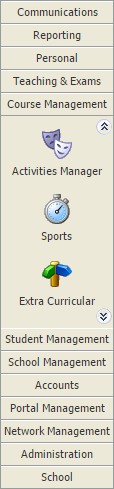
- Select a child activity module from the module bar:
- Select the Group View tab:

Categories are identified by the icon in the tree menu on the left. Groups are listed underneath categories in the tree.
 Click Add Pupils to Group in the Group Options panel.
You can also click Add Pupils in the header bar once you have selected Manage Group Properties in the Group Options panel.
The Add Pupils screen is displayed:

The group that you are working with can be changed using the drop-down list in the header bar.Use the filters available if a high number of pupils are listed (this reduces the volume of records shown):

Five filters are available to work with:FilterSelect to search for pupils by...Pupil Search Name and gender. School Structure Year group, form, boarding house and academic house. Pastoral Pastoral tutor, form tutor and year group tutor. Academic Departments, subjects and teaching sets. Custom Groups Pupil custom groups. Hold Ctrl to make multiple selections in each filter.
Use the checkboxes next to each pupil name to select the pupils that you want to add to the group.
- Amend the Start Date and End Dates for the selected pupils if you need to. This determines the dates that the pupils are linked to the group.
- Click Add Pupils.
You are prompted Add Pupils to Schedules? - Select Yes to add the selected pupils to all activity schedules.
The pupil list is updated.