
Use the Timetable Statistics option in the Timetable Manager module to either:
- View usage statistics for each teacher in your timetable. This could be useful when allocating staff resources.
or - Edit a teacher's timetable.
To work with teacher usage statistics:
- Open the Timetable Manager module and select the timetable tab that you want to work with:

- Select Timetable Statistics from the right hand menu and select the Daily Teacher Usage tab:
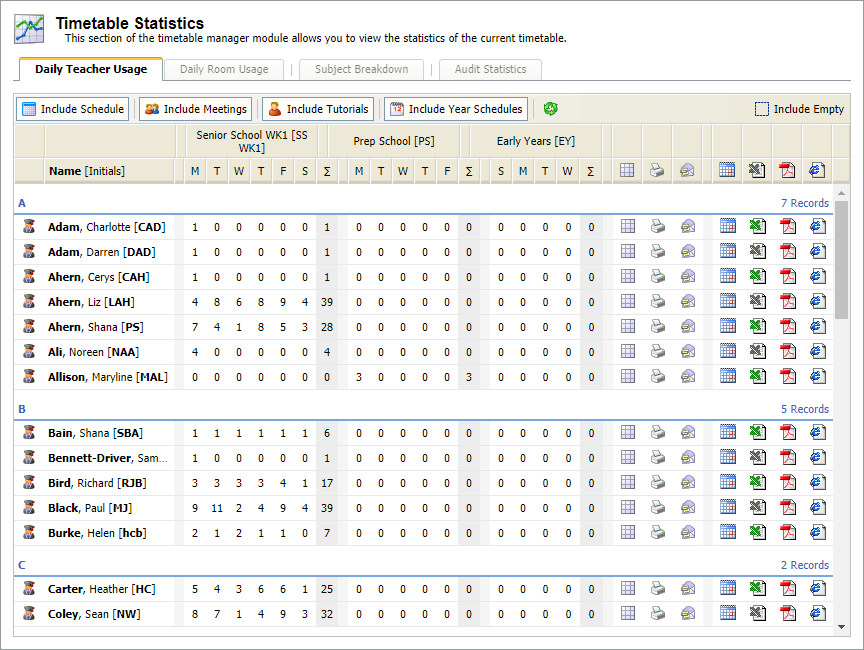
- The number of utilised weeks in each day of your timetable is shown in the columns. The sum total for each week is also displayed.
- Click on a teacher's name to view their contact details.
- Use the filters to refine the list displayed:

- Select the timetable activities you want to include in statistics. All activities are displayed by default, deselect an activity by clicking on it. Include or exclude selected timetable activities, such as meetings, from the statistics listed to identify how teachers are utilised within your school.
- Check Include Empty to include all teachers with empty timetables.
Scroll to the teacher that you want to work with.
Use the icon buttons available to:
Icon Use to... 

For example, change the room or teacher allocated to a lesson or edit the list of attendees for a staff meeting. Remember that editing timetables may cause clashes to occur in other parts of your timetable.
An example of the window displayed is shown below:

Making changes to a timetable will automatically change the timetable entry for all other students, teachers and rooms linked to that timetable. For example, removing a lesson from a student timetable completely removes the same lesson from all timetables.
- Scroll through the window displayed to view all of the selected teacher's timetables. Different types of period entry default to display in different colours.
- Use the drop down list in the top right of the window to display information from a different timetable tab, if required.
- Use the Show Published Cover Arrangements checkbox to display any Cover Manager module changes to the timetable.
- Use the edit and delete buttons in period boxes to change any entries in the selected timetable. The delete icon may not be available in all timetables, this is setup to display from the Configuration tab.
Choose to edit a:Hold Ctrl to select multiple periods and group edit or delete. The periods selected must be of the same entry type to group edit or delete.
- Click Print View if you need to print a copy of the timetable.
- Click Close Window once you have completed any amendments.
- Click
 to refresh the display to include the edited timetable.

This is an example of the window displayed:

- Scroll through the window displayed to view all of the selected teacher's timetables.
- Use the drop down list in the top right of the window to display information from a different timetable tab, if required.
- Use the Merge Duplicate Lessons checkbox to merge lessons being taught in the same period. This saves space when printing. Ensure that lessons are still clearly recognised if you merge lessons.
- Click Print Timetable.

For example, e-mail a revised timetable to a teacher.
This is an example of the window displayed:

- Complete the Sender and Recipient details. These default to display your name and the teacher selected but can be edited if required.
- Select the Timetable Format that you want to use. Multiple formats can be selected. For example, attach a timetable as a PDF document for the recipient to review and also attach it as an ICS document for the timetable to export directly into the recipient's calendar.
- Use the Optional Comment field to enter an additional message for the e-mail if required.
- Edit the Message Body template if you need to.
- Click Send Timetable Email.
An email is sent to the recipient with the timetable attached in your chosen format.


