
Use the Cycle Manager tab in the Reports Manager module to manage the allocation of pupils and report templates to each report type used in your report cycle.
Select a different report template for each group of pupils allocated to a report type, if required.
For example, allocate the 'Form Tutor Report' to a report cycle. Select to filter pupils by 'Form', choose the form groups that you want to include and select the 'Form Tutor' template to write reports for these pupils. Add another allocation selecting 'All Pupils' and select a different template for this group of pupils. Form tutors must write pupil reports for the selected forms using the 'Form Tutor' template and write all other form reports using the other template.
- The report cycle must be inactive before you add allocations.
- Editing a Report Cycle which has been used affects all the reports within the cycle.
- In the Reports Manager module, select the Cycle Manager tab:

Click Edit Allocations in your selected report cycle. The Manage Allocations window is displayed:

Each report type has a corresponding tab in the window.Select a report type tab to work with.
The groups of pupils already allocated to each report type and the report templates to be used are listed at the top of the window. Exclusions are listed at the bottom of the window.Choose to:

You must allocate pupils before reports and assessments can be written.
Click Add Allocation.
- The Create Allocation Type window is displayed:
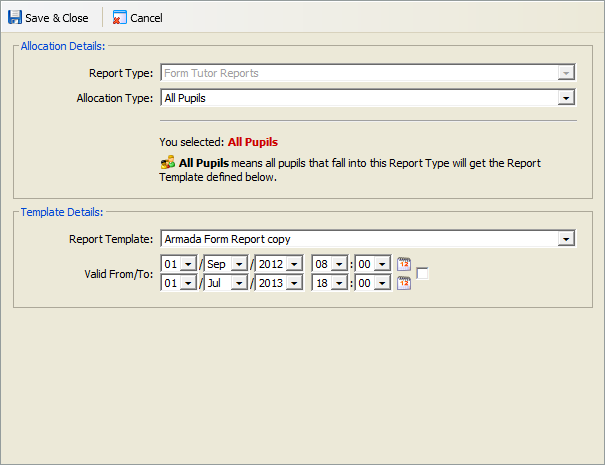
- Use Allocation Type to filter the pupils allocated to the report. The selections listed depend on the tab you are working in. For example, in the Form tab the selection includes 'All Pupils', 'Year' and 'Form'.
Depending on your selection in Allocation Type, additional fields are displayed:- Select pupils to allocate to the report. Hold Ctrl to make multiple selections. The name and content of this field is dependant on your selection in Allocation Type, for example selecting 'Form' displays a list of form groups in this field.
- Enter Participation Dates. These fields are only displayed when using the Activity tab. Select the dates that pupils have taken part in an activity. For example, select the dates of 1 October 2012 and 31 October 2012 for rugby and only pupils who have taken part in rugby between these dates are listed in reports.
- Use the Report Template drop down list to allocate a report template to the report. Ensure that you select a report template appropriate to the report cycle you are working in. For example, select a 'Form assessment' template when writing assessment reports for a form. This ensures that reports operate as expected.
- Select dates that the report can be used, this is optional. This restricts the use of the report template. An error message is displayed if you attempt to write reports for pupils outside of these dates.
- Click Save & Close to return to the Manage Allocations window.
- Choose to:
- Add more allocations.
- Exclude pupils, or groups of pupils, from the report if required.
- You can now activate the report cycle for use.
The order that allocations are listed in each report type determines the report template that is applied to pupil reports.
Report templates are allocated in a top down structure to the pupil groups listed in the Manage Allocations window. List the allocation with the least number of pupils first to ensure that report templates are used as expected.
For example, list a selected form first and choose an report template to be used for that form. List 'All Pupils' second and select the report template to be used for all other pupils. If, in this example, 'All Pupils' is listed first the same report template is used for all pupil reports. Pupils in the form which is listed second are already captured in the 'All Pupils' allocation so do not have a different report template applied to their reports.
To change the order of allocations, follow the steps below,
- Click Order Allocations.
This window is displayed:
- Click on an allocation to move it and use the arrows to change the order displayed.


In the example shown a different report template has been selected for 'Form - Y10-x' than is used for all other pupils. Listing 'Form - Y10-x' first ensures that the selected report template is used for the pupils in that form. - Click Save & Close.
Choose to edit the allocation of report types and report templates in a report cycle. You may want to do this to change the dates that a report template is available.
It is not recommended that allocations are amended once a report cycle is in use. Editing an active report cycle affects all the reports within the cycle.
- Click
 in your selected allocation.
The Edit Report Type window is displayed: - Use Allocation Type to filter the pupils allocated to the report. The selections listed depend on the tab you are working in. For example, in the Form tab the selection includes 'All Pupils', 'Year' and 'Form'.Depending on your selection in Allocation Type, additional fields are displayed:
- Select pupils to allocate to the report. Hold Ctrl to make multiple selections. The name and content of this field is dependant on your selection in Allocation Type, for example selecting 'Form' displays a list of form groups in this field.
- Enter Participation Dates. These fields are only displayed when using the Activity tab. Select the dates that pupils have taken part in an activity. For example, select the dates of 1 October 2012 and 31 October 2012 for rugby and only pupils who have taken part in rugby between these dates are listed in reports.
- Use the Report Template drop down list to allocate a report template to the report. Ensure that you select a report template appropriate to the report cycle you are working in. For example, select a 'Form assessment' template when writing assessment reports for a form. This ensures that reports operate as expected.
- Select dates that the report can be used, this is optional. This restricts the use of the report template. An error message is displayed if you attempt to write reports for pupils outside of these dates.
- Click Save & Close to return to the Manage Allocations window.
- Choose to:
- Add more allocations.
- Exclude pupils, or groups of pupils, from the report if required.
- You can now activate the report cycle for use.
This is a useful housekeeping function.
Do not remove any allocations which have been used. Removing allocations which have been used causes reports to also be deleted.
- Click
 in your selected allocation.
You are prompted Are you sure you wish to delete this allocation? - Select Yes.
The allocation is removed from the report cycle. - Click Close Window.