
Use the Configuration tab in the Reports Manager module to set up the use of selected functions in the Reporting modules:
- Open the Reports Manager module and select the Configuration tab.
Three options are listed under Configuration on the right hand side.
Choose from:
Use to make selected functions available in the Cycle Manager tab of the Reports Manager module:
- Select Module Configuration in the right hand menu.
The Configuration screen is displayed: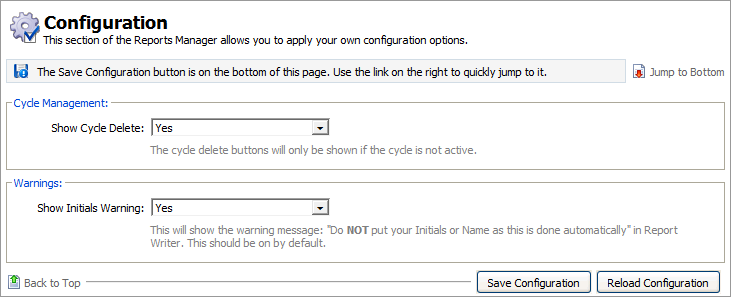
- Use the drop down lists available:
- Show Cycle Delete. Select 'Yes' for the Delete function to be available in the Cycle Manager tab. Selecting 'No' ensures that reports are not accidentally deleted. Deleting a report cycle which has been used also deletes any reports associated with it.
- Show Initials Warning. Select 'Yes' to display a warning message when writing reports in the Reports module. This reminds users that they do not need to sign off in the comments box when writing reports as their name is automatically displayed on reports when they are saved. Select 'No' if report comments are being written by multiple users and you want each user to sign off at the end of their comments.
- Click Save Configuration to save changes. Click Reload Configuration to reload the last saved changes.
Restrict user access to reports written by other report writers. For example, you may only want your Deputy Head to view reports written by Heads of Year.
- Select View as Other in the right hand menu.
The Configuration screen is displayed:
- Check the Restrict View as Other box. Leave this box unchecked for all users to have unrestricted access to all reports.
- Click Change Permissions to display the Report Type Permissions window:

- Make selections from the boxes displayed and use the arrows to move your selections as required. Hold Ctrl to make multiple selections.
- Click Save & Close once you have set up the permissions as required.
Use to set up display functions in the Assessments module:
- Select Online Assessment System from the right hand menu.
The Configuration screen is displayed:
- Select to display incomplete reports as blue or green when saved. It is recommended that you select 'Blue Status' here so that incomplete reports are highlighted blue to distinguish them from complete reports, which are highlighted green.
- Use the drop down list available to set up the procedure to be applied when Grade Limits have been exceeded in a report group:
- 'Prevent Saving Reports'. Reports cannot be not saved when grade limits have been exceeded.
- 'Warning Only'. A warning is displayed when grade limits have been exceeded. You are able to override the grade limits set up in Report Templates.
- Click Save Configuration to save changes. Click Reload Configuration to reload the last saved changes.
- Select Module Configuration in the right hand menu.
Three options are listed under Translations options.
Choose to:Report Translation. This function is still being developed.
- Student Languages. This function is still being developed.
Two options are listed under Maintenance options.
Choose to:- Reports Subject Order. This function is still being developed.