
Use the Configuration tab in the Registration module to:
- Manage the templates for registration alerts which are e-mailed from the school register.
- View an audit log of all e-mailed registration alerts.
E-Mail Templates for Registration Alerts
All registration alert e-mails are based on a template. A default e-mail template is setup in iSAMS, this can be amended to suit your school. Contact your iSAMS Administrator if you want to setup a different template to the one provided.
To edit the default template:
- Open the Registration module and select the Configuration tab.
- Select Email Settings from the right hand menu to display this screen:
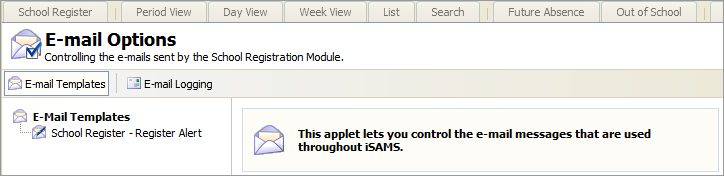
- Select E-mail Templates.
- Click on a template title in the list shown to display the template:
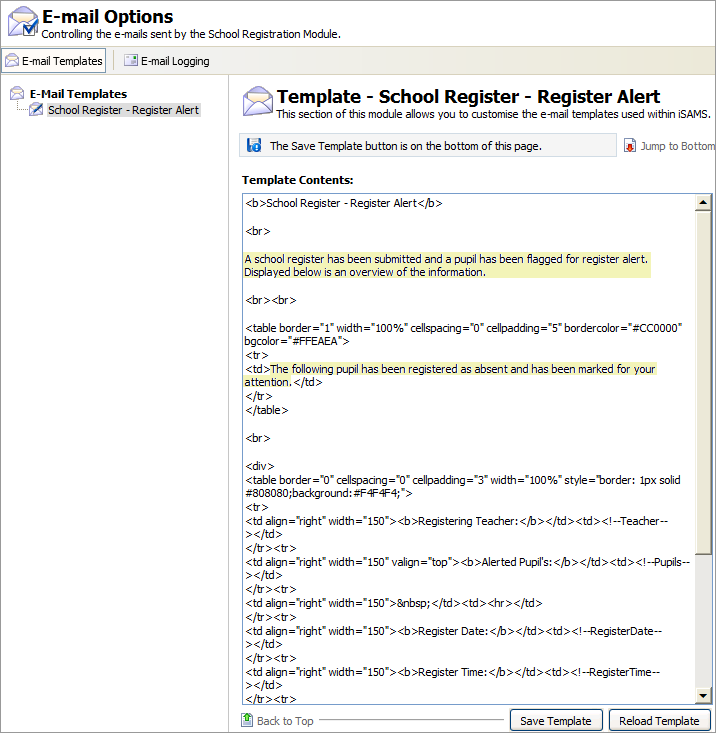
The highlighted text above indicates the information which you can edit without affecting the structure of the template. - Change the text in the template to suit you.
- Click Save Template to save the changes you have made.
This is the e-mailed registration alert based on the template shown:
E-mail Logging
This function logs a history of all the registration alerts sent by e-mail when the Alert button is used in the school register.
- Open the Registration module and select the Configuration tab.
- Select Email Settings from the right hand menu to display this screen:
Select E-mail Logging to display this screen:
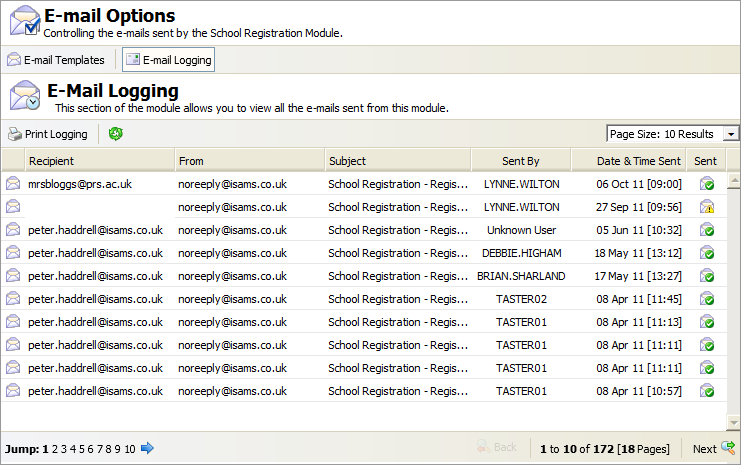
Each alert e-mail is logged with basic details and an icon indicating the sent status of the alert:Sent Status
Indicates that the alert...

Is an e-mail.

Has been sent. An e-mail will only be sent if recipients have been selected in the Registration Alert Settings.

Has not been sent. An item will not be sent when the recipient's e-mail address is not valid or missing from iSAMS.
Use the navigation tools to find the alert that you want to view.
- Click on a username in the Sent By column to view contact details of the sender.
- Click Print Logging if you need a hard copy of the audit log. Only the alerts displayed on the screen are printed.