
Use the Configuration tab in the Registration module to set up the registration alert function. Registration alerts can be sent from the school register to contact a preselected list of recipients alerting them of a student's absence.
- Open the Registration module and select the Configuration tab.
- Select Alert Settings from the right hand menu to display this screen:
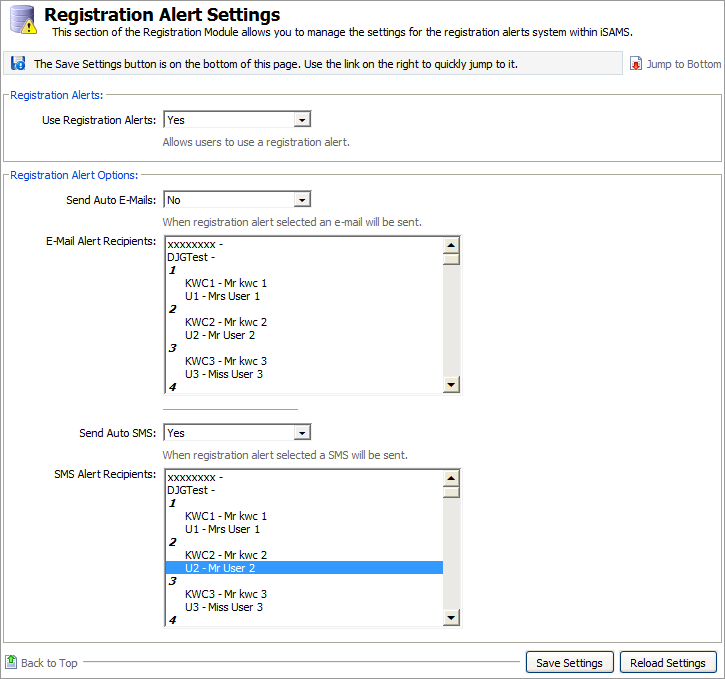
Work through the settings shown:
Setting
Explanation
Registration Alerts
Use the drop down list to select whether registration alerts are to be used in the school register.
Registration E-mail Alert Options
- Send Auto E-Mails. Use the drop down list to select whether a registration alert is sent via e-mail. A history of e-mailed alerts is listed in the module.
- E-Mail Alert Recipients. Scroll through the list to select recipients of e-mail alerts. Hold down the Ctrl key to select more than one recipient. It is important to ensure that current contact details are held in iSAMS for the recipients of registration alerts. The recipients list available to you is made up of all 'Administrator' and 'Teacher' users within iSAMS. User contact details can be edited through the Users Accounts applet in the Control Panel.
- Send Auto SMS. Use the drop down list to select whether a registration alert is be sent by SMS. No history is kept of alerts sent by SMS.
- SMS Alert Recipients. Scroll through the list to select recipients of SMS alerts. Hold down the Ctrl key to select more than one recipient.
When the details are as required, click Save Settings.
Use the Reload Settings button to cancel any changes you have made to these settings, i.e. reset the values as they were when you first accessed this form. The Reload Settings button only cancels changes if you have not already saved them.
- You can now create templates for your registration alerts.