
Use the Private Programmes option in the External Exams Manager module to manage private exam programmes. Private programmes are used for subjects not taught in your school but have candidates who are using your school as an exam centre.
Programmes link subjects and exam options to imported BaseData. Once BaseData is imported it is automatically pulled in and matched with programmes and the corresponding options. Each programme is displayed across all the exam cycles you create in iSAMS so you do not have to repeat the process with each new exam cycle.
- You must create a programme for each subject and level of qualification (GCSE and A Level).
- Private Programmes will not display any data for the selected exam cycle until BaseData has been imported.
- You must create a new programme if you change exam board for a subject.
- It is recommended that you create a single programme for GCEs, rather than separate ones for AS and A2.
To use the Private Programmes option:
- Open the External Exams Manager module and select the BaseData tab.
- Select Private Programmes from the right hand menu (this screen is completely blank when you first start working with the External Exams Manager module):

Use the drop down list in the header bar to select the exam cycle that you want to work with.
Create a programme for each subject and level of qualification.
Once programmes have been created, choose to:
Choose to group together programmes if you want to, listing A Levels together or listing programmes alphabetically.
- Click Order Programmes in the header bar.
The Sort Programmes window is displayed: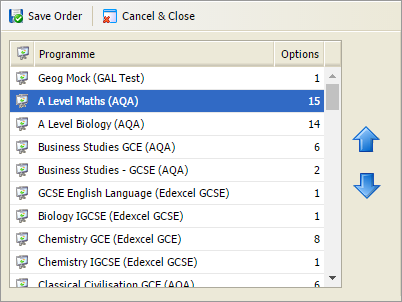
- Select a programme from the list displayed. Use the arrows available to move it up or down the list, as required.
- Click Save Order when finished.
Programmes are displayed in the revised order.
Choose to change an existing programme, such as the name or status of the programme. Do not change the exam board for a programme. If the exam board is switched for a selected programme, archive the programme and create a new one. This ensures that all data held under the old exam board is retained.
- Use the filters available to list the programme that you want to work with:

- Scroll to the programme that you want to work with and click
 .
.
The Edit Programme window is displayed: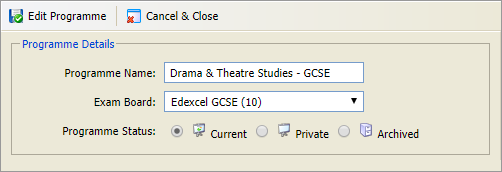
- Add a clear and concise Programme Name. Programme names do not have to follow an exam board convention, however it is recommended that you clearly distinguish between GCSE and A Level programmes.
- Select a Programme Status:
- Current. For subjects currently taught in your school.
- Private. For subjects not taught in your school but have private candidates using your school as an exam centre.
- Archived. For programmes that are not currently active in your school but may be used at a later date.
- Click Edit Programme.
Choose to archive a programme which is no longer in use. For example, archive a programme if you are using a different board for a subject. Archive the existing programme and create a new one with the revised exam board.
- Use the filters available to list the programme that you want to work with:
- Scroll to the programme that you want to work with and click
 .
.
You are prompted Are you sure you want to archive this programme? - Select Yes.
The programme is moved to Archived Programmes.
Choose to delete an existing programme if it has been added in error..
- Use the filters available to list the programme that you want to work with:
- Scroll to the programme that you want to work with and click
 .
.
You are prompted Are you sure you want to delete this programme? - Select Yes.
The programme is deleted permanently.
- Click Order Programmes in the header bar.
Add options to each programme. Options are the qualifications and components of each qualification.
Once options have been added, choose to:Choose to change an existing option, such as edit the option title. Do not change the option code.
- Use the filters available to list the programme that you want to work with:
- Scroll to the programme and option that you want to work with and click Edit in the right hand of the screen.
A popup window is displayed: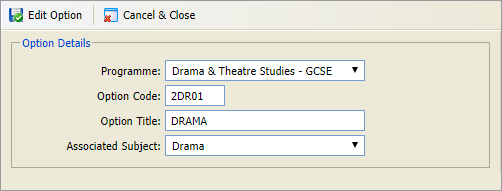
- Select an alternative Programme if the option has been added to the wrong programme. Each option cannot be added to duplicate programmes.
Do not change the Option Code as this data feeds back to the exam board. - Edit the Option Title if you need to. You may want to change option titles for clarity, for example change 'Drama' to 'Drama GCSE Assessment 1'. The option title is shown on exam timetables and reports, changing it does not effect the BaseData as this works with the option codes.
The Associated Subject field is not relevant for private programmes as the subject is not taught in your school. - Click Edit Option.
Choose to group the options listed in for a programme in your preferred order.
- Use the filters available to list the programme that you want to work with:
- Scroll to the programme and option that you want to work with and click
 .
.
A popup window is displayed: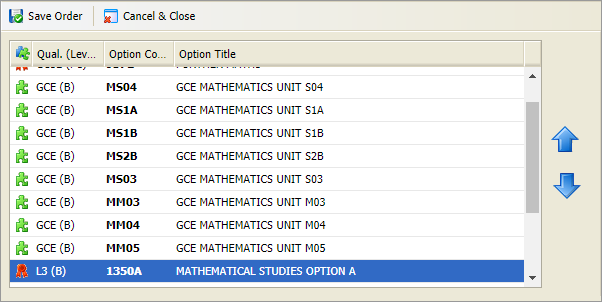
- Select an option from the list displayed. Use the arrows available to move it up or down the list, as required.
- Click Save Order when finished.
Options are displayed in the revised order.
Choose to archive an option which is no longer in use. Use this function instead of deleting an option so that an audit trail is maintained.
- Use the filters available to list the programme that you want to work with:
- Scroll to the programme and option that you want to work with and click Archive in the right hand of the screen.
You are prompted Are you sure you want to archive this option? - Select Yes.
The option is now listed in the Archived Programmes option.
Choose to delete an existing option if it has been added in error and never been used.
- Use the filters available to list the programme that you want to work with:
- Scroll to the programme and option that you want to work with and click Delete in the right hand of the screen.
You are prompted Are you sure you want to delete this option? - Select Yes.
The option is deleted permanently.
- Options may display as unmatched if the corresponding BaseData has not yet been imported.
- Programmes may display as unmatched if exam options are not relevant in the exam cycle you are working in.
- Select Hide Unmatched in the header bar to temporarily clear the screen of any unmatched programmes and options for the selected exam cycle.
- Use the filters available to list the programme that you want to work with: