
Use the BaseData tab in the External Exams Manager module to manage the options listed in exam programmes. Programmes link subjects and exam options to imported BaseData. Once BaseData is imported it is automatically pulled in and matched with programmes and the corresponding options. Each programme you create, and the options listed in it, is displayed across all the exam cycles you create in iSAMS.
When adding options to a programme, add the qualifications and the units which can be completed to make up each qualification in the programme. Some schools teach towards more than one qualification under a single programme and each qualification can be made up of a selection of units listed in the programme.
Programmes and exam options must be linked for exam entries and results to operate as expected.
To add an exam option:
- Open the External Exams Manager module and select the BaseData tab.
- Select any of the Manage options from the right hand menu. It does not matter at this stage which of the options you select, the status of the programme is determined further on in the process.
An example of the screen displayed is shown below.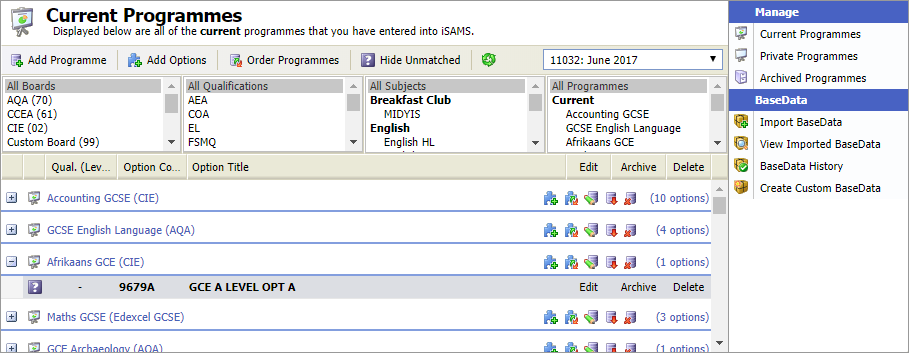
Use the drop down list in the header bar to select the exam cycle that you want to work with.
- Click
 in your selected programme.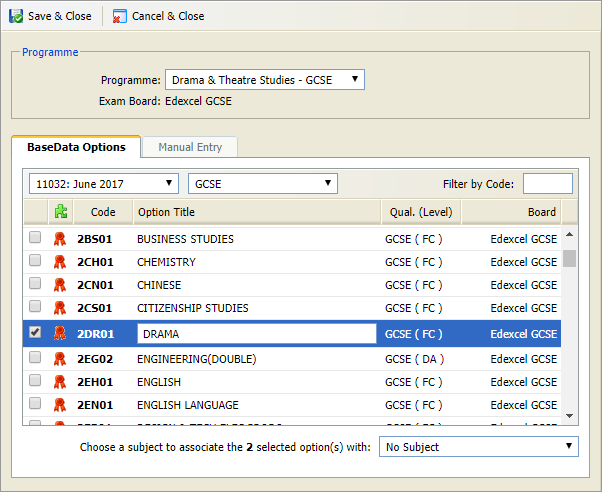
- Use the Programme drop down list to select the programme you want to work with. Programmes of all status are shown in this list ('Current', 'Private', 'Archived'). The Exam Board is shown automatically.
- Select the BaseData Options tab.
- The exam cycle you are working in is shown in the first drop down list. Check that it is the correct cycle.
- Either:
- Use the second drop down list to filter the options by qualification if you need to.
or - Enter the option code in the Filter by Code box, if you know it, click away to display your chosen option.
- Use the second drop down list to filter the options by qualification if you need to.
- Scroll through the list and check the options you want to add to the programme. Options are made up of the qualifications and the units that can be taken under the programme. More than one qualification may be listed in a single programme.
Any options which cannot be selected have already been added to a programme. - Edit the Option Title if you need to. You may want to change option titles for clarity, for example change 'Drama' to 'Drama GCSE Assessment 1'. The option title is shown on exam timetables and reports, changing it does not effect the BaseData as this works with the option codes.
- Use the drop down in the bottom right of the window to select a teaching subject to associate the option with. This ensures that as candidates are added to the exam cycle they are linked to their subject teaching sets in the Teaching Manager module.
- Click Save & Close.
The new programme is listed in the appropriate screen:Each programme is displayed across all the exam cycles you create in iSAMS.
As more BaseData is imported it is automatically pulled in and matched with existing options.
- Options may display as unmatched if the corresponding BaseData has not yet been imported. Options which have not been matched with BaseData are greyed out. Open the View Imported BaseData option to see a breakdown of the components which are matched to an option.
- Programmes may display as unmatched if exam options are not relevant in the exam cycle you are working in. Click Hide Unmatched in the header bar to temporarily hide the unused programmes.