
Use the View Student tab in the Teaching Manager module to view a student's parent and emergency contact details quickly.
See Contact Students in a Teaching Set if you want to send and keep a log of any emails sent from the Teaching Manager module. This is recommended.
To view student contact details, follow the steps below:
- In the Teaching Manager module, select the Student View tab:

- Use the drop down list in the top right of the screen to select the academic year that you want to work with.
Use the filters available to display the students you want to work with:
Filter Search by... Pupil Search A selection of fields listed in pupil records.
School Structure - Year.
- Form Group.
- Boarding House.
- Academic House.
Use these filters, for example, to search for Year 10 students from a selected boarding house.
Pastoral - Pastoral Tutor.
- Form Tutor.
- Year Tutor.
Select to display your selected tutor's students.
Academic - Department.
- Subject.
- Set.
Use these filters, for example, to search for students in a selected Art set.
Custom Groups Any custom pupil group. These are configured in the Pupil Manager module. Applicants Applicant enrolment year. Click on a student's name on the left of the screen to display their academic programme:
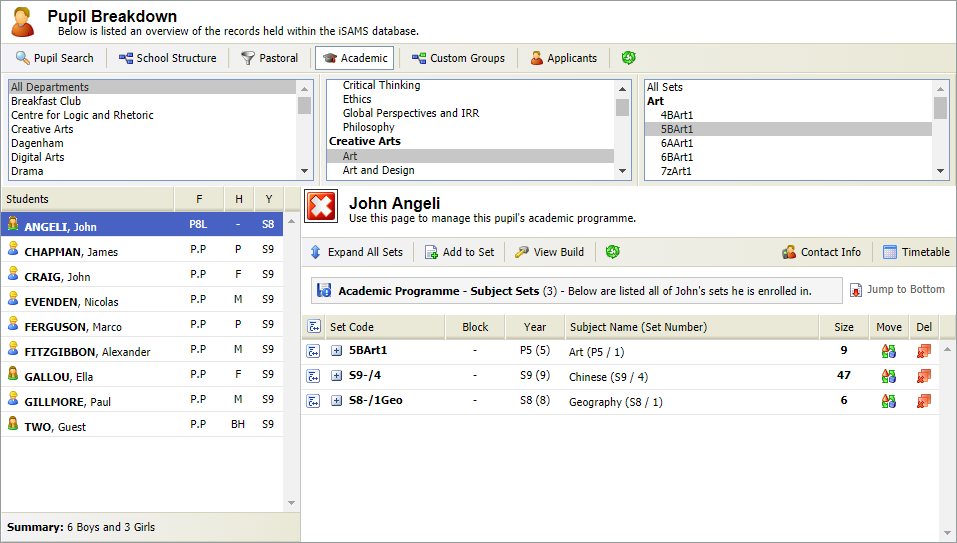
- Click
 Contact Info on the right of the screen.
Contact telephone numbers and email addresses are displayed:
- Click on an email address to send a message. Your email provider opens in another window. No record is kept of the email.