
Use the Candidate Marks option in the External Exams Manager module to search for a specific candidate, form group or house and view their coursework marks.
- Always check that you are working in the correct exam cycle; the BaseData containing exam programme details is specific to each exam cycle.
- Staff can also use the External Exams wizard in the wizard bar to view coursework marks.

To use Candidate Marks:
- Open the External Exams Manager module and select the Coursework tab.
- Select Candidate Marks from the right hand menu to display the Candidate Coursework Marks screen:
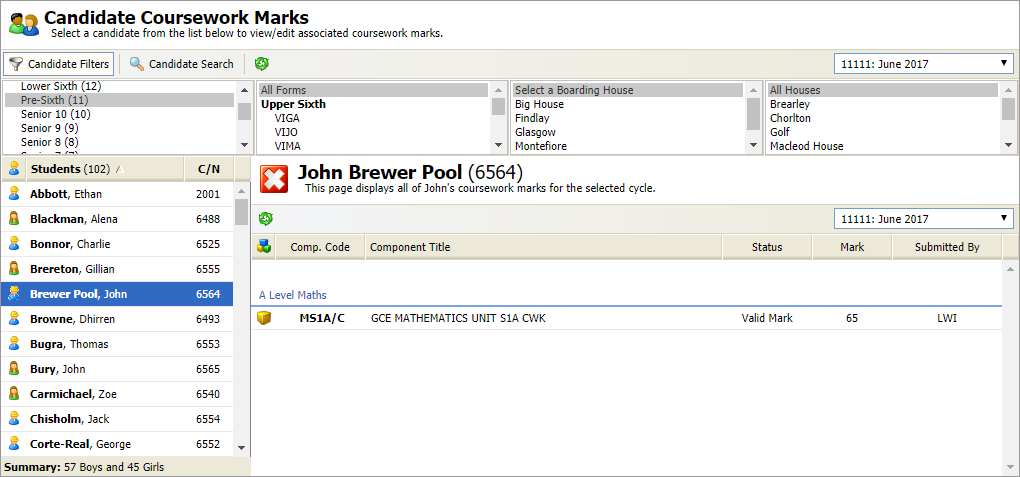
Use the drop down list in the header bar to select the exam cycle that you want to work with.
- Use the filters available to find the candidates that you want to work with. Use either:
- Candidate Filters. Search by current school year, form group, boarding house and academic house.
or - Candidate Search. Search by name, UCI number and candidate number.
- Candidate Filters. Search by current school year, form group, boarding house and academic house.
- Scroll through the list displayed on the left and click on the candidate you want to view.
The candidate's current coursework marks are displayed. Use Programme Marks if you need to update any coursework marks. You can now run the Candidate Report to check candidate coursework marks.