
Use the Programme Forecasts option in the External Exams Manager module to view and enter forecast grades by searching through the exam programmes available in your selected cycle.
This option is useful for entering forecast grades in bulk for a selected exam option.
- Always check that you are working in the correct exam cycle; the BaseData containing exam programme details is specific to each exam cycle.
- Forecast grades can only be entered for the options that candidates have been entered for in the Entries tab.
- Staff can also use the External Exams wizard in the wizard bar to enter forecast grades.

To use Programme Forecasts:
- Open the External Exams Manager module and select the Forecasts tab.
- Select Programme Forecasts from the right hand menu to display the Programme Forecasts screen:
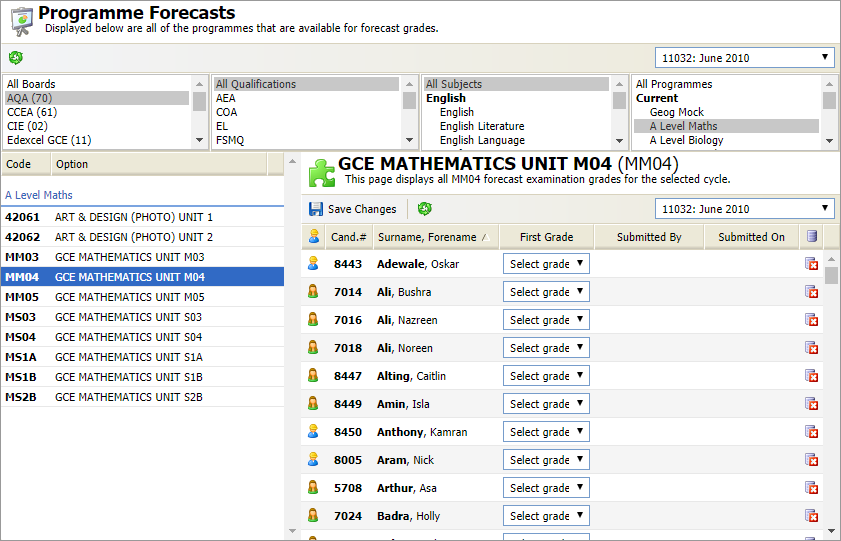
Use the drop down list in the header bar to select the exam cycle that you want to work with.
- Use the filters available to list the programmes that you want to work with:

Your filtered programmes are displayed. - Scroll to the programme and options that you want to work with and click on an option to view the candidates entered.
- Use the drop down next to each candidate to record their forecast grade for the option.
Only gradesets which have been imported into iSAMS and matched with BaseData for the exam cycle are available for selection. - Click Save Changes. You are prompted once the grade has been saved.
- You can now run the Option Forecast Report to check the forecast grades entered for a selected programme or option.