
Use the Forms tab in the School Manager module to print, export or email a form list in your preferred format. Lists are broken down by form and include details of associated pupils. This is useful for sending out form lists to users with no access to the School Manager module.
To print or export a list of school form groups, follow the steps below:
- In the School Manager module, select the Forms tab:

- Click
 or
or  by the form you wish to print or export.
A popup window is displayed:

- Click Back.
The Form Selection screen is displayed: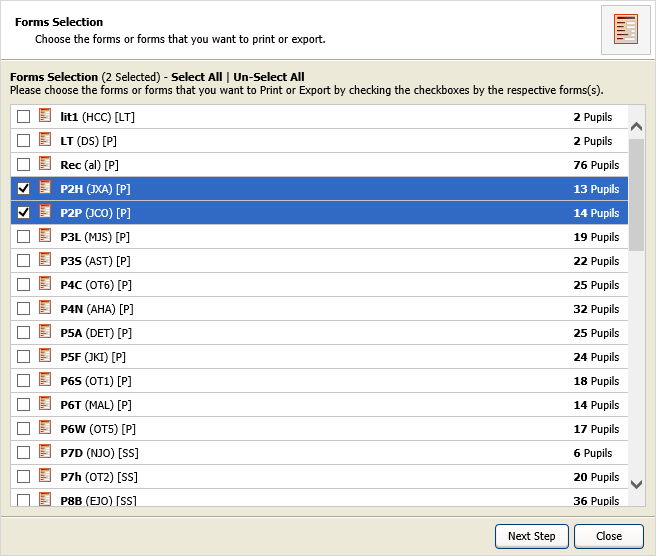
- Either:
- Use the checkboxes available to select the forms you wish to print or export.
or - Click Select All to select all the forms displayed.
- Use the checkboxes available to select the forms you wish to print or export.
- Click Next Step to move on.
- Click Back.
- Work through the checkboxes in the tabs displayed to select the fields that you want to include in your form list.
- Click Next Step.
The Format Selection And Email Options screen is displayed: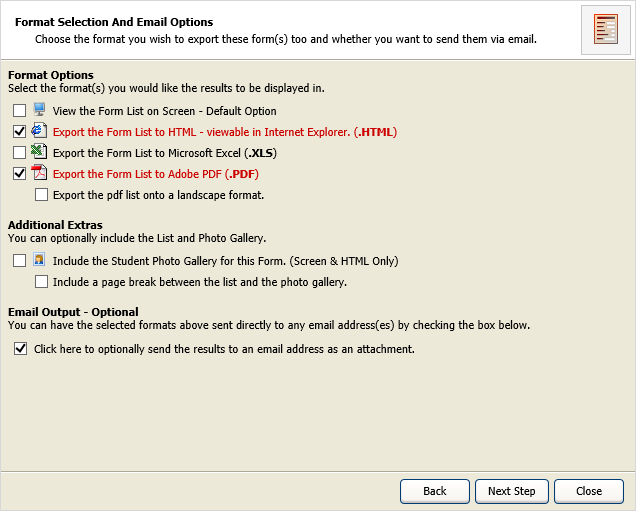
- Use the checkboxes:
- Format Options. Select a format for your list. More than one format can be selected.
- Additional Extras. Choose to include photos and select how these are displayed.
- Email Output. Receive the list via email. Checking the box sends your list to the email address linked with your iSAMS account. This is optional.
- Click Next Step.
- Either:
- Your list is displayed, ready for printing.
or
- The Download And View Results screen is displayed:

- Click on a link to view the list in your chosen format.
- Your list is displayed, ready for printing.
- Click Finish to return to the Forms tab.