
Use the Configuration tab in the Registration module to remove duplicate registration records held in the Registration module. This may occur at the start of a new term when new forms and sets have been added. Students may be incorrectly listed in more than one form or set.
To remove duplicate registration records, follow the steps below:
- Open the Registration module and select the Configuration tab.
- Select Remove Duplicate Groups from the right hand menu to display this screen:
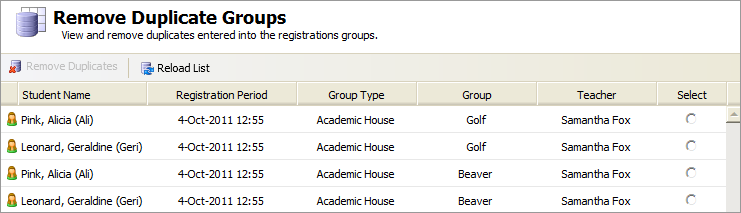
- Click the Select button for the duplicate entry you want to keep. The registration records selected are highlighted in green.
The registration records highlighted in red are to be removed from the registration group: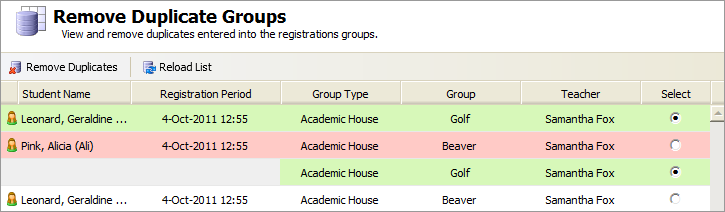
- Click Remove Duplicates.
If you have selected a registration record that has been used in the module, you are warned
The groups highlighted in green will be used for reporting against. Are you sure you want to proceed? - Either:
- Click No and Reload List to remove your selection.
or - Click Yes to remove the duplicate.
- Click No and Reload List to remove your selection.