
Use the Configuration tab in the Calendar Manager module to manage the calendars listed in iSAMS. Each calendar created, along with its properties, is listed in the Configuration tab.
You must add calendars to start using the Calendar Manage module.
- In the Calendar Manager module, select the Configuration tab:

- Select the Calendars option:

Choose to:

Create a calendar for each section of your school:
- Click Add Calendar. This button is located in the bottom right of the screen, you may need to scroll down to find this. A popup window is displayed:
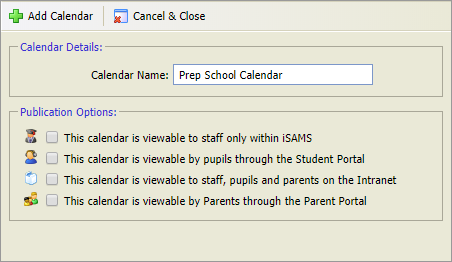
- Enter a clear and concise Calendar Name in the field available.
- Use the checkboxes available to select where your calendar is published. For example, selected calendars maybe for internal use only and should only be viewed by staff.
- Click Add Calendar.
The new calendar is listed in the Configuration tab. All calendars are listed in alphabetical order. You can now add moderators to your calendar, this is optional.
Moderators can be added to each calendar, if required. Any iSAMS user can be set up as a moderator to authorise events which are added to calendars.
- Scroll to your selected calendar and click Add Mod. A popup window is displayed:
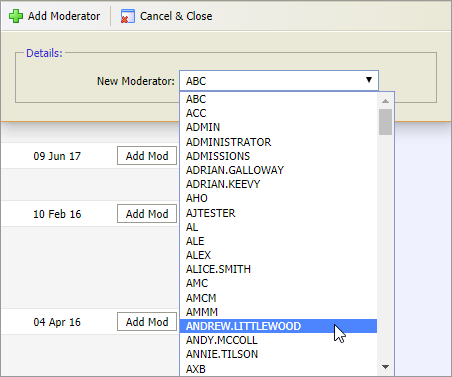
- Scroll though the list display and select a moderator. Moderators can only be added one at a time.
- Click Add Moderator.
The moderator is listed under the appropriate calendar:
Repeat the process to add more moderators, if required.
Choose to edit the name and publication options of any calendar listed in iSAMS. For example, you may want to increase the level of access to a calendar once all events have been added for the term.
- Scroll to your selected calendar and click Edit. A popup window is displayed:
- Edit the Calendar Name, if required. Use a clear and concise name.
- Use the checkboxes available to select where your calendar is published. For example, selected calendars maybe for internal use only and should only be viewed by staff.
- Click Edit Calendar.
The edited calendar is listed in the Configuration tab. All calendars are listed in alphabetical order. You can now add or delete calendar moderators, this is optional.
You may want to do this if staff responsibilities change.
- Scroll to your selected calendar.
- Click
 next to the moderator you want to remove.
The moderator is removed. The edited calendar is listed in the Configuration tab.
- Click Add Calendar. This button is located in the bottom right of the screen, you may need to scroll down to find this. A popup window is displayed: