
Use the Report Printing module to review a selection of pupil reports in a grade matrix format. This is useful for quickly reviewing reports for a whole year group at one time.

- Open the Report Printing module and select the Grading Matrix tab.
- Select a Template from the drop down list (or upload a new template):
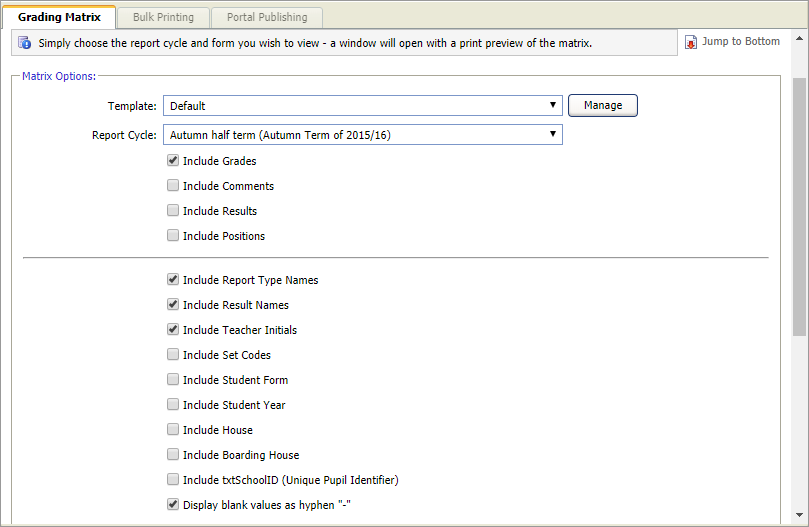
This template determines the formatting of your grade matrix. - Select the Report Cycle you want to review. Only completed reports or assessments written in this report cycle are included your grade matrix.
- Use the checkboxes to select the report data and information that you want to include in your grade matrix. Only select the options that you need in order to save space on your grade matrix.
- Use the drop down lists in the Matrix Filters section to select a group of pupil reports to display in your grade matrix. Making no selections in Matrix Filters leads to all pupil reports being included in your grade matrix.
- Click Run Grade Matrix at the bottom of the screen.
The Grade Matrix is displayed in a separate window: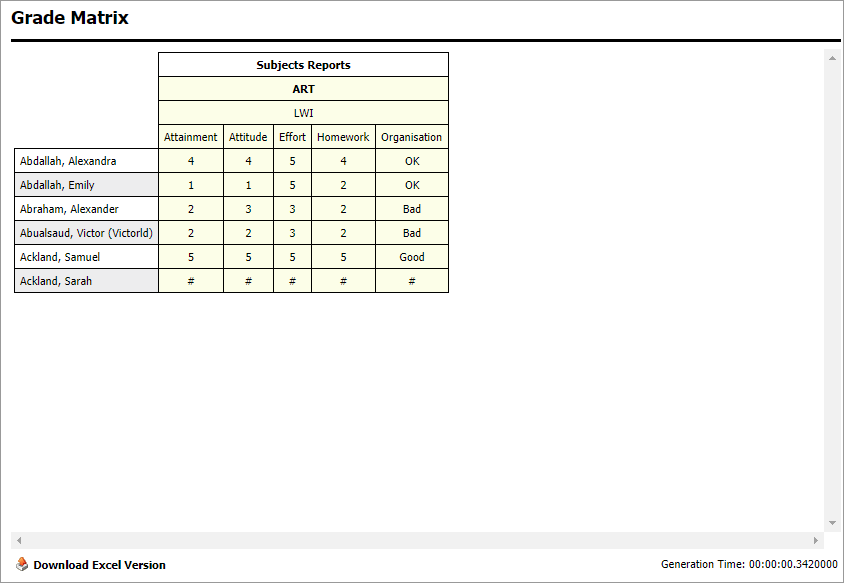
- Click
 Download Excel Version and Open or Save the file, as required.
 - Choose to edit the spreadsheet. For example, quickly calculate an average grade for a group of pupils.